Why Your Stock Keycaps Are Costing You Money
Most people treat their keyboards like toys. They look for pretty colors. They want “thocky” sounds. They focus on aesthetics.
This is a mistake.
Your keyboard is a tool. It is the primary interface between your brain and the marketplace. If you are a writer, a coder, or an entrepreneur, you are paid for your output. Speed is the metric. Accuracy is the variable.
If you travel, you likely use a low-profile keyboard. It fits in the backpack. It weighs less. But stock keycaps on 90% of travel boards are garbage. They are made of cheap ABS plastic. They get slick. Your fingers slip. You make typos. You backspace.
Every backspace is lost revenue.
I don’t care about how “cute” your setup looks. I care about ROI. We are going to look at the best low-profile keycaps that increase friction, improve accuracy, and fit the most popular travel boards on the market today. We are optimizing for speed.
The Physics of Speed: Materials Matter
Before you buy anything, you need to understand the mechanics. Not all plastic is the same. There are two main materials used in keycap manufacturing:
- ABS (Acrylonitrile Butadiene Styrene): This is what comes on your laptop and most stock keyboards. It is smooth. It is cheap to produce. Over time, it develops a “shine.” That shine is oil buildup. Oil reduces friction. Less friction means your fingers slide off the center of the key. That causes errors.
- PBT (Polybutylene Terephthalate): This is the standard for high performance. It is dense. It is textured. It does not shine. It feels like dry sandstone. It grips your fingertip.
If you are serious about output, you only buy PBT. It costs more upfront. It lasts forever. The ROI is immediate because you stop sliding off the home row.
Profile Geometry: Flat vs. Sculpted
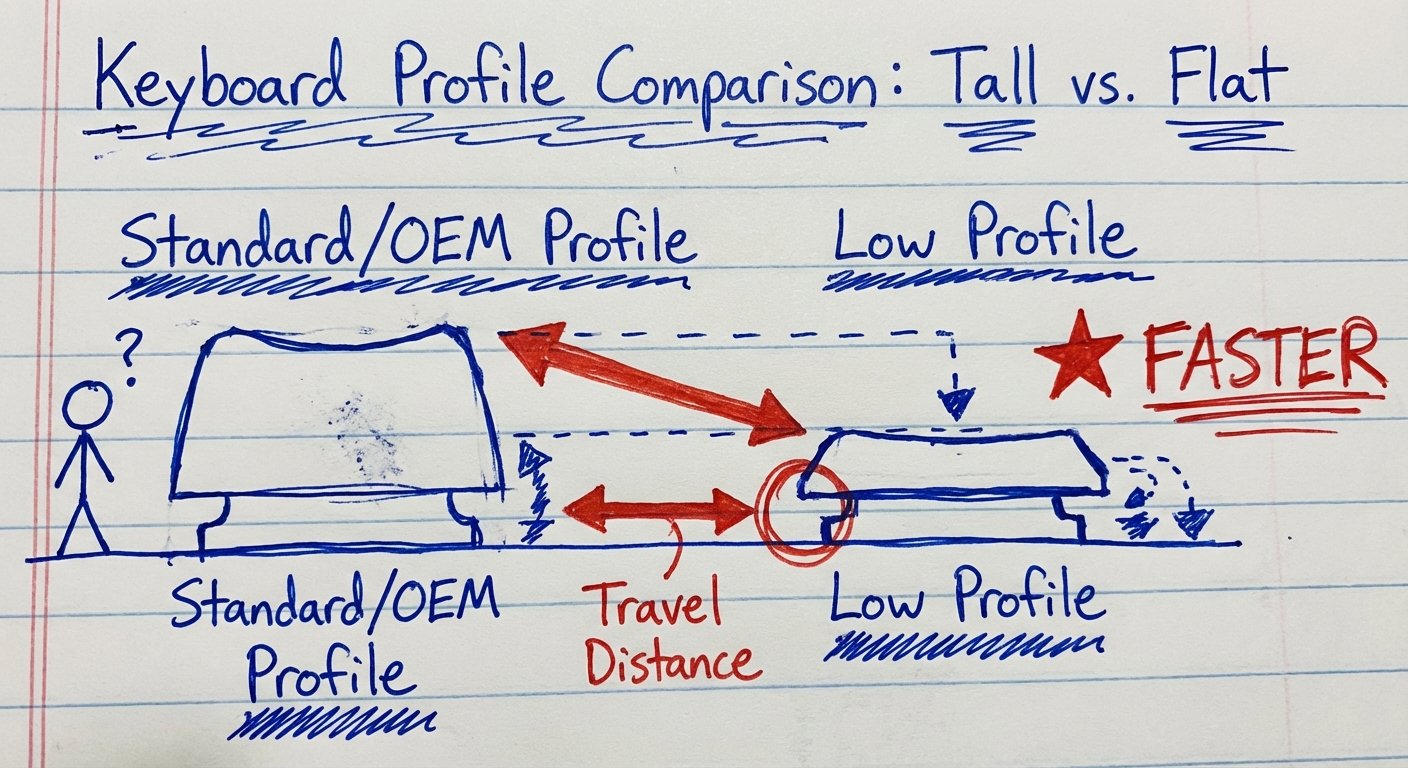
Low-profile keyboards have a problem. They are flat. Standard desktop keyboards use “sculpted” profiles (like Cherry or OEM) where the keys are angled to meet your fingers. Flat keyboards force your hands into unnatural positions.
To fix this, manufacturers created specific low-profile shapes:
- XDA / DSA: Completely flat and uniform. Good for aesthetics, bad for touch typing orientation.
- nSA / LSA: Sculpted low profile. These have a slight curve and height difference between rows. This mimics a desktop feel but keeps the board thin.
You want sculpted low-profile caps. They guide your fingers to the center of the key. Below are the top contenders that fit these criteria.
1. NuPhy Air Series Keycaps (nSA Profile)
If you are using a NuPhy Air75 or Air96, or any keyboard with Gateron Low Profile switches, these are the gold standard. NuPhy didn’t just shrink a normal keycap; they re-engineered the geometry.
The profile is called nSA. It features a spherical top surface. Imagine a tiny bowl for your fingertip. When you strike the key, the curve centers your finger. This allows you to type with more force and less precision while maintaining accuracy.
The Specs
- Material: High-content PBT.
- Profile: nSA (Low profile spherical).
- Legends: Dye-sublimation (The letters never fade).
- Compatibility: Fits Gateron Low Profile switches perfectly.
The ROI
These are expensive compared to generic sets. But the texture is aggressive. It feels like dry paper. Your fingers do not slip. If you type 10,000 words a week, the time saved on error correction pays for the set in month one.
Current Price: $30 – $45
2. Keychron Low Profile Double-Shot PBT (LSA Profile)
Keychron dominates the hardware market. Their K-Pro series is solid. But their older stock keycaps were bad. They fixed this with the new LSA (Low Profile Spherical Angled) sets.
The main selling point here is the “Double-Shot” manufacturing. This means the keycap is two molded pieces of plastic plastic fused together. The legend (the letter) is a separate piece of plastic that goes all the way through. You could sand the keycap down by 2mm and the letter would still be there.
The Specs
- Material: Double-Shot PBT.
- Profile: LSA.
- Durability: Maximum. These are tank-grade.
- Visuals: High contrast, usually black/white or grey/orange.
The Logic
These are heavier than the NuPhy caps. That extra mass changes the acoustic signature of the board (making it quieter) and adds a solid feeling to the bottom-out. If you are heavy-handed typist, get these.
Current Price: $35 – $50
3. XVX / Womier Low Profile Keycaps (The Value Play)
Maybe you don’t want to spend $50 on plastic squares. I get it. You want 80% of the performance for 40% of the price. That is where XVX (often branded as Womier) wins.
XVX flood the market with “Skyline” low-profile caps. They are PBT. They are double-shot. They fit almost everything (Cherry MX stems).
The Specs
- Material: Double-Shot PBT.
- Profile: Uniform Low Profile (flatter than LSA, taller than DSA).
- Compatibility: Extremely high. Fits standard 60%, 65%, 75%, and 100% layouts.
The ROI
The texture isn’t as gritty as NuPhy. The legends aren’t as sharp as Keychron. But they are $20. If you are currently typing on greasy stock ABS caps, this is the cheapest upgrade you can make to improve your workflow.
Current Price: $18 – $25
4. AZIO Slim Keycaps (For Specific Builds)
Sometimes you aren’t optimizing for speed; you are optimizing for a specific environment. If you work in a high-end client office or a boardroom, you cannot bring a keyboard that looks like a carnival ride. You need professionalism.
AZIO makes low-profile caps that fit their Cascade series, but they often fit other standard stems. They focus on backlighting. If you work in the dark (video editors, developers), you need “shine-through” legends. Most high-end PBT caps block light. AZIO caps let the light through the letters.
The Specs
- Material: ABS/PBT hybrid (depends on model) or coated.
- Feature: Backlight compatible.
- Aesthetic: Minimal, “Apple-esque”.
The Warning
These are often ABS with a coating. They will feel smooth. They will eventually shine. You buy these strictly if you need to see your keys in pitch-black environments. Otherwise, stick to PBT.
Current Price: $25 – $40
The Compatibility Trap (Don’t Be Stupid)
Here is where people lose money. They buy a set of keycaps that doesn’t fit their keyboard. They assume all “Low Profile” is the same. It is not.
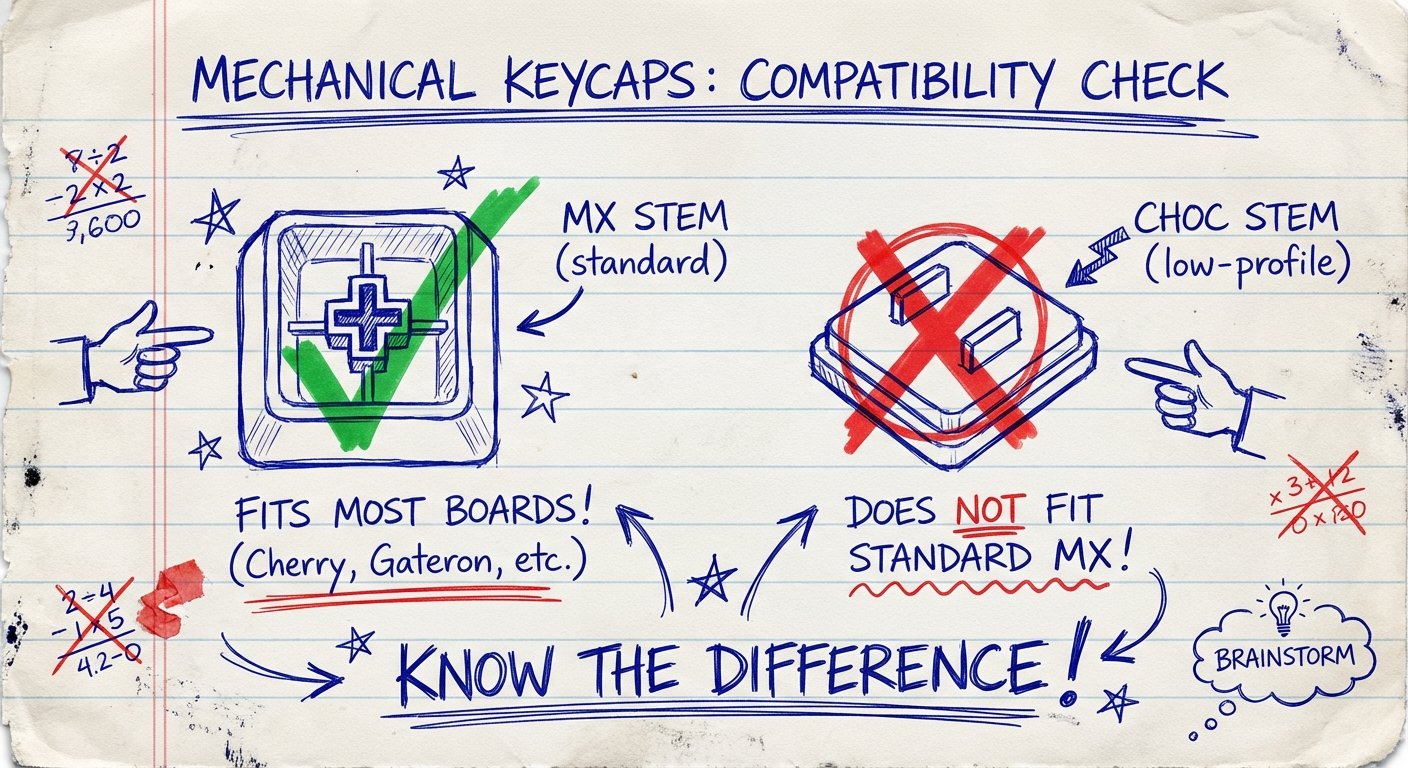
There are two main types of switch stems in the low-profile world:
- MX Style Stems: Looks like a plus sign (+). Used by Gateron Low Profile (NuPhy, Keychron), Cherry Low Profile, and standard switches. Buy the keycaps listed above for these.
- Choc Stems: Looks like two prongs (“pig nose”). Used by Kailh Choc switches. These are common on hardcore ergonomic split keyboards (like the Corne). The keycaps above will NOT fit these.
Check your switch. Pull a keycap off. Do you see a plus sign? You are safe. Do you see two prongs? Do not buy the caps in this article. You need MBK or Choc-specific caps.
Also, check your stabilizers. The Spacebar, Shift, and Enter keys have extra stems. On standard keyboards, these are standardized. On low-profile keyboards, companies like Keychron and NuPhy sometimes move the stabilizers by a few millimeters. This creates “non-standard spacing.”
The Fix: Stick to the brand ecosystem if you are worried. Put NuPhy caps on NuPhy boards. Put Keychron caps on Keychron boards. Use XVX if you are willing to risk a slight mismatch on the spacebar (though usually, they are fine).
How to Install for Max Efficiency
Do not use your fingers to pry off caps. You will break the stem. You will ruin a $150 keyboard to save 30 seconds.
Use a wire keycap puller. Not the plastic ring that comes with cheap boards. The plastic ring scratches the paint off your keycaps. Use the wire one.
The Process:
- Take a photo of your keyboard before you start. You will forget where the “Page Up” key goes.
- Remove all caps.
- Clean the board. There is hair and dust in there. It’s disgusting. clean it.
- Install the large keys first (Space, Enter, Shift). Ensure the stabilizers engage.
- Install the alphas.
This takes 15 minutes. It changes the feel of the board for the next 3 years.

Conclusion: Stop Researching, Start Typing
You have the data. The math is simple.
If you type on stock ABS keycaps, you are accepting a suboptimal interface. You are choosing to be slower. You are choosing to let your fingers slip.
For $30, you can upgrade the primary tool of your trade. You get PBT texture. You get sculpted ergonomics. You get durability.
- Best Overall: NuPhy Air Keycaps
- Best Durability: Keychron LSA
- Best Value: XVX / Womier
Pick one. Install it. Get back to work.